Media2URL
IMAGE TO URL TOOL

Image to URL Converter for Direct Image Links

A picture can be ready to use and still be staying on your phone or computer when a website asks for an image URL without the option to upload the image. Media2URL handles this exact situation through the Image to Link tool. You just need to upload the supported images once, then the finished result gives you its direct image URL that another site can reach. JPG, PNG, WebP and supported GIF files use the same uploader, so there is no separate workflow for each format when you only need to turn an image into a URL.

The result also includes the other link or embed formats available for that upload. A CMS or website field that needs the picture itself can use the direct image URL, while a client or teammate can open the share page when they only need to view the image in a browser.


Upload an image
Upload image

Drag and drop files or paste from your clipboard

JPG, PNG, WebP, GIF, and other accepted image files

Guest mode · up to 2 MB per file · 10 uploads per day · sign in for more or upgrade for larger files

See the product flow

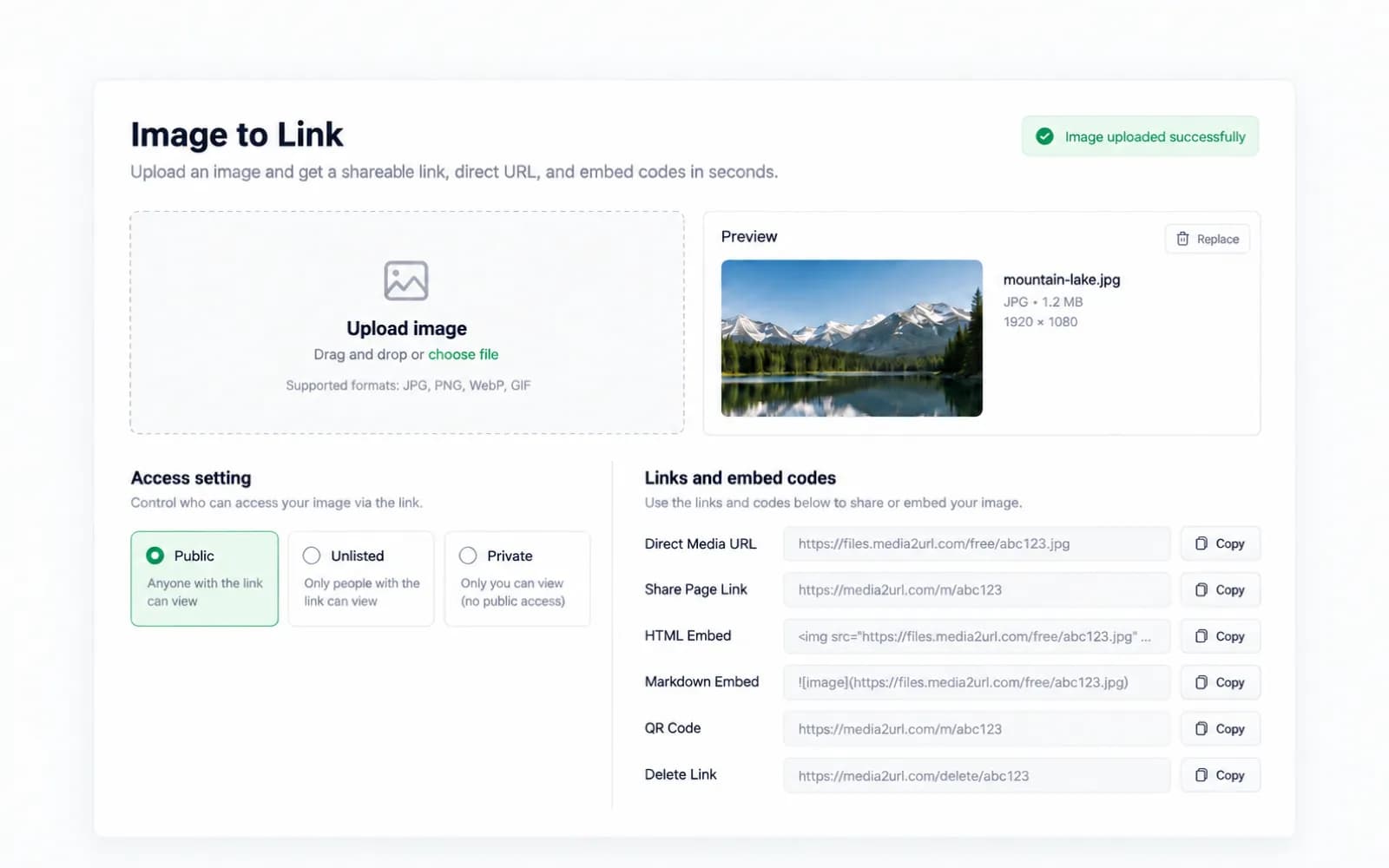
The Image to Link result keeps the direct image URL, share page, embed formats, access setting and removal controls together after the upload finishes. You can see the available outputs in one place and copy the one that matches what you plan to do with the image next.

Media2URL Image to Link Converter showing image upload, direct image URL, share page, HTML and Markdown outputs

How it works

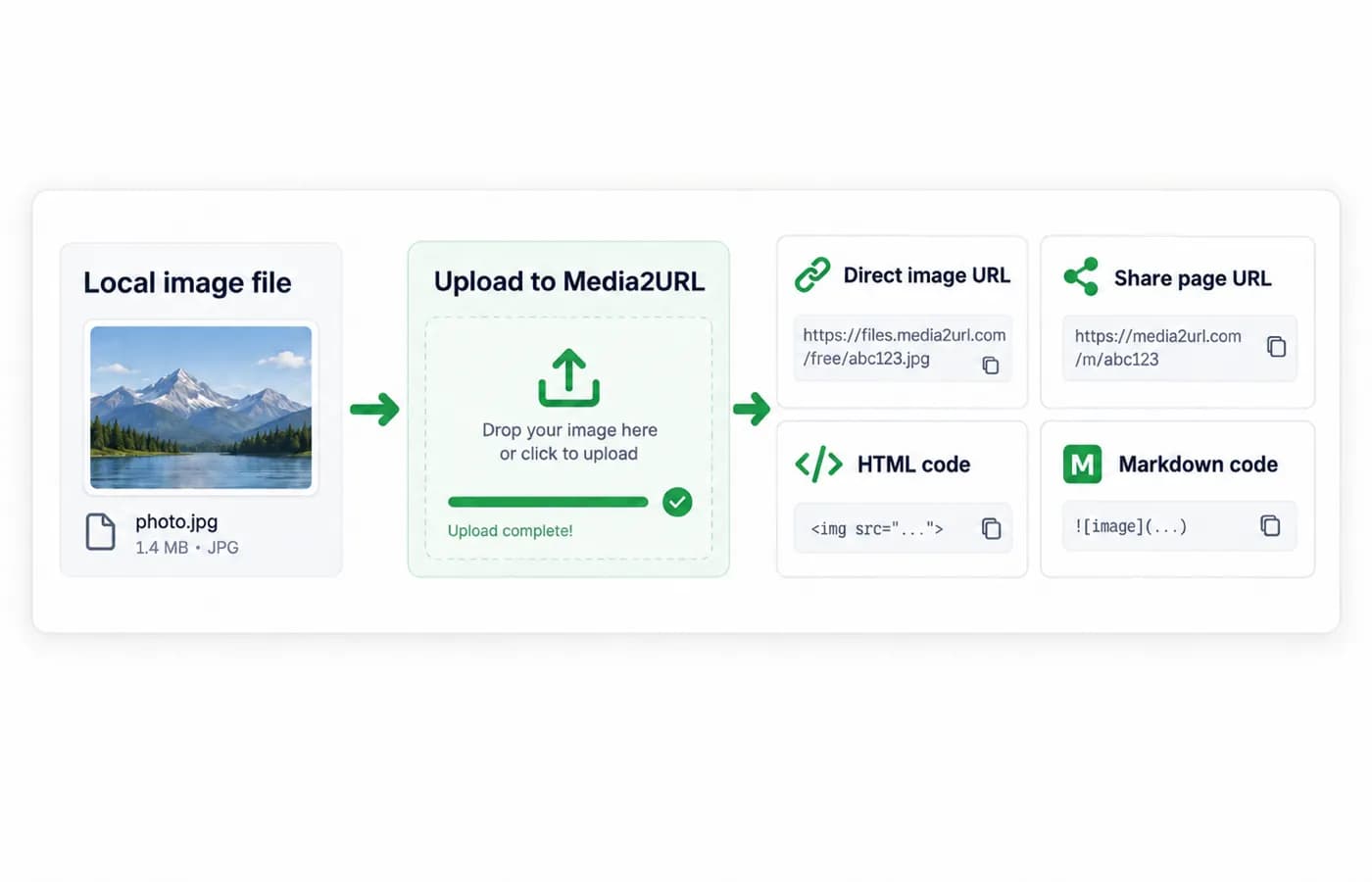
Upload once, then choose the format that fits the website, document or person who needs the image next. The result can be used as a direct image URL when another system needs the file itself, while the share page is easier when somebody simply needs to open the image.

An image URL is the online address used to load a hosted image. When the picture is still only on your phone or computer, another website cannot reach it through a public web address. Uploading the supported file gives you an online version that can be used where a URL is required.

Image to URL workflow showing a local image uploaded to Media2URL and turned into a direct URL, share page, HTML and Markdown

REAL USE CASES

Where an image URL is actually useful

An image URL or image link becomes useful when the next website or document needs an online address instead of another file upload. The same issue appears when an online tool asks for the image source. The best output depends on what should happen after the image has been uploaded.

Use an image inside a website or CMS

A website builder or content management system may ask for an image URL instead of a file from your computer. Upload the image and use the direct image URL when the website needs to load the hosted image itself.

Example

Image URL

https://files.media2url.com/free/abc123.jpg

Best output: Direct image URL

Add an image to Markdown or documentation

README files, documentation pages and some editors use Markdown to display images. After the upload finishes, copy the generated Markdown format when the document needs the hosted image instead of writing the complete syntax yourself.

Example

![Product screenshot](https://files.media2url.com/free/abc123.jpg)

Best output: Markdown format

Add product images to a catalogue or spreadsheet

An ecommerce product catalogue may keep the product details in a spreadsheet while the image is hosted online. When the sheet asks for an image URL, use the direct image address so the product row points to the hosted image.

Example

ProductImage URL
Travel Backpackhttps://files.media2url.com/free/abc123.jpg

Best output: Direct image URL

Share an image with a client or teammate

Sometimes the image is not going into another website at all. You may simply need a client or teammate to open it from an email, message or support conversation without receiving another attachment.

A share page works well in this situation because the person opens a normal browser page around the image instead of receiving only the raw image file.

Example

Here is the image for review:

https://media2url.com/m/abc123

Best output: Share page

The same upload can provide more than one useful output. Choose the direct image URL when another website or tool needs the image itself, and use the share page when the next step is normal browser viewing.

The image to URL workflow

Choose the image URL that fits where you will use it

Once the image finishes uploading, the result panel keeps the available links and embed formats in one place. If you came here to turn an image or photo into a URL, you can copy the output that matches where the file will be used.

A website or HTML image field normally needs the direct image URL because it is trying to load the image itself. A client message may work better with the share page, while Markdown can use the generated snippet when the image belongs inside documentation.

If you are deciding between the two, read the direct URL versus share page guide before copying a link.

<img src="YOUR_GENERATED_IMAGE_URL" alt="Uploaded image" />

Replace the example value only after the upload finishes and the result panel gives you the actual URL.

Direct Media URL

The Direct Media URL opens the uploaded image itself instead of a Media2URL share page. Use the direct image URL when a website, CMS field or HTML element needs the hosted image as its source.

Share Page Link

The Share Page Link opens the image inside a normal Media2URL page. It is usually easier when you are sending the photo to another person who should view it in a browser before deciding what to do with the file.

HTML image code and Markdown

Copy the generated HTML image code or Markdown snippet when the destination expects markup rather than a bare image URL. This saves you from rebuilding the syntax after every upload.

Delete Link and QR

Your account can include a delete link for early removal, so keep it if it is shown after upload. The QR code is useful when the image will be opened from another device.

Use the image link that matches the next step

A direct image URL is useful when a website or CMS field needs the hosted image itself. The same link can also be used in HTML or documentation when those places expect an image source rather than a viewing page.

The same Image to Link Converter can turn a supported photo into a URL for a form or product catalogue. JPG and PNG files use the same upload flow, so the file format does not require a completely separate tool.

If you regularly use image hosting for a website or project, saving the files to your Media2URL account makes them easier to find later. You can return to the media library instead of searching through old messages for the original upload.

Access choices are shown in the uploader

Not every image needs the same type of access. A public image is fine for a website, while a client file may need an expiry setting or restricted access.

The uploader shows the visibility and expiry options available for your account. Private image links or image links protected by a password can depend on the selected plan.

Before you share an image link

Think about where the image will be used before choosing its access settings. An image meant for a public website may need a normal public link, while a client image or temporary screenshot may be better with an expiry setting or restricted access where your plan supports it. For a comparison focused on temporary image hosting, see the Media2URL vs Kommodo comparison. If you are comparing image hosting workflows, see the Media2URL vs PhotoToURL comparison.

Only upload images that you own or have permission to share. If the file contains information that should not remain public, check the available visibility settings before copying the link and sending it elsewhere.

Files saved to your account can be managed later from the dashboard. Details about file removal, retention and platform rules are available in the Privacy, Data Retention and Acceptable Use pages.

Image link questions

Which image formats can I upload?

The uploader accepts image files that pass Media2URL's server policy. JPG, PNG, WebP and GIF are common examples. SVG is rejected by the current upload policy.

Are an image URL, image link and picture URL the same thing?

They often describe the same basic need: an online address that another website or application can use to reach an image. The exact link still matters because a direct image URL points to the hosted image itself, while a share page opens a normal webpage around the picture.

How do I turn a JPG or PNG into a link?

Upload the JPG or PNG through the Image to Link tool and wait for the upload to finish. The result panel shows the available direct image URL, share page and supported embed formats for that file.

You do not need a separate JPG to URL or PNG to URL workflow when both formats are accepted by the same uploader. You can start as a guest with files up to 2 MB and 10 uploads per day, then sign in for more uploads or view the available plans for higher limits.

How do I get an image URL for a picture or photo?

If the picture or photo is stored only on your phone or computer, it needs to be uploaded somewhere online before another website can reach it through a public URL. Upload the supported image through the Image to Link tool, wait for the upload to finish, then copy the direct image URL or another available sharing option from the result panel.

The same process works for a camera photo or saved picture file. Use the direct image URL when another website or application needs the image itself, and use the share page when someone mainly needs to open it in a browser.

Is Media2URL an image URL generator?

Yes. Media2URL hosts a supported image online and gives the picture its own image URL. The completed upload also keeps the available sharing and embed formats together, so you can copy the format accepted by the place where the image will be used.

What links appear after the image finishes uploading?

The result panel shows a Direct Media URL, Share Page Link and Delete Link. It also shows HTML Embed, Markdown Embed and a QR code for the completed upload.

When should I use the direct image URL?

Use the direct image URL when a website, CMS field or HTML element needs the image itself. Use the share page when you are sending the image to someone who should open it inside a normal browser page.

Can an image link expire or require access control?

Yes. The uploader shows the visibility and expiry options available for your account, along with password protection where supported. Private image links and image links protected by a password can depend on your current plan.

Other media tools

Select another specialized converter to create direct links or share pages for your files:

Video to Link Converter

Upload MP4, MOV, and WebM videos for direct stream links and browser player pages.

GIF to Link Converter

Turn animated GIFs into direct delivery URLs and shareable browser links.

Bulk Image Upload

Batch upload multiple image files simultaneously and collect link outputs.

Temporary Image Upload

Create image links that expire after a short time, with customizable duration windows.

Screenshot to URL

Capture screen frames or upload saved screenshots to get instant shareable links.